Pay Bill
Overview
Covers the My Bill list, the Bill Pay screen, and the payment confirmation/receipt that follows a successful payment.
Navigate to: Home → Bills (bottom navigation)
My Bill
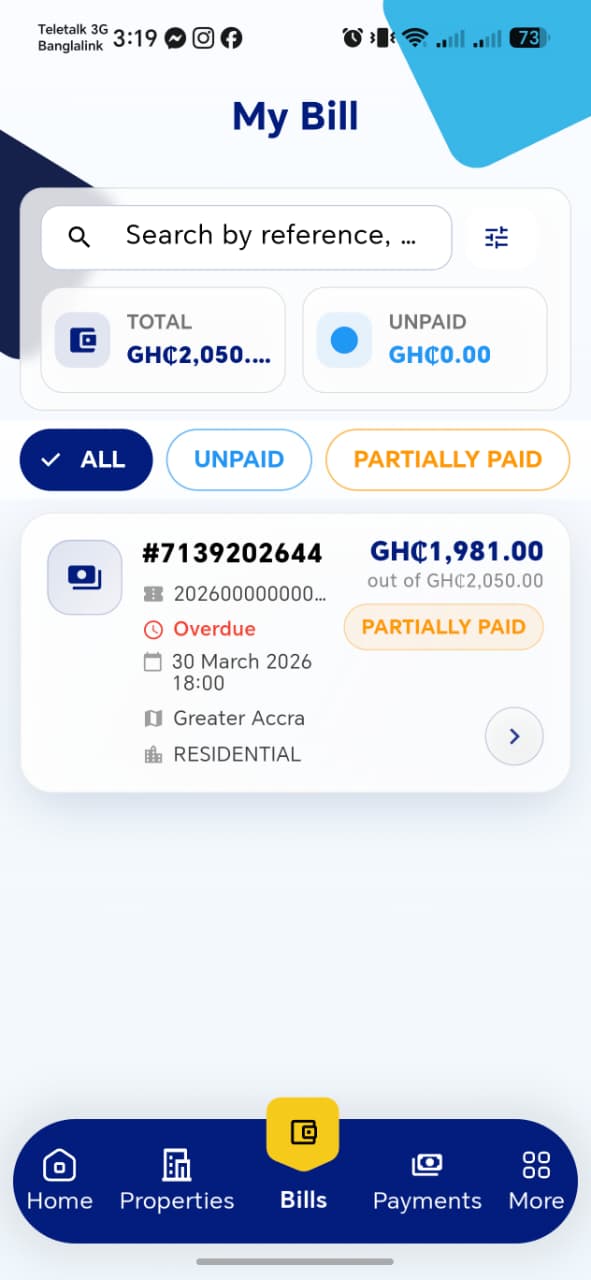
| Element | Description |
|---|---|
| Search bar | Search by reference; a filter icon sits alongside for additional filtering |
| TOTAL card | Total billed amount across all properties |
| UNPAID card | Total unpaid amount — distinct from "partially paid," which is not counted here |
| Filter tabs | ALL, UNPAID, PARTIALLY PAID, and at least one more tab off-screen (likely PAID/OVERDUE) |
Bill Card
| Field | Description |
|---|---|
| Bill ID | e.g. #7139202644 |
| Reference/Bill No | Truncated, e.g. 202600000000... |
| Overdue flag | Shown in red with a clock icon when past due date |
| Due Date | e.g. 30 March 2026 18:00 |
| Region | e.g. Greater Accra |
| Property Type | e.g. RESIDENTIAL |
| Amount | Outstanding amount "out of" the total bill, e.g. GH₵1,981.00 out of GH₵2,050.00 |
| Status badge | e.g. PARTIALLY PAID |
Tapping a bill card (chevron on the right) opens Bill Pay.
Things to check
TOTALandUNPAIDsummary cards match the sum of the actual bill list below them- Filter tabs correctly narrow the list (e.g.
PARTIALLY PAIDonly shows bills in that state) - The
Overdueflag only appears once the due date has actually passed - Search by reference returns the correct bill
Bill Pay
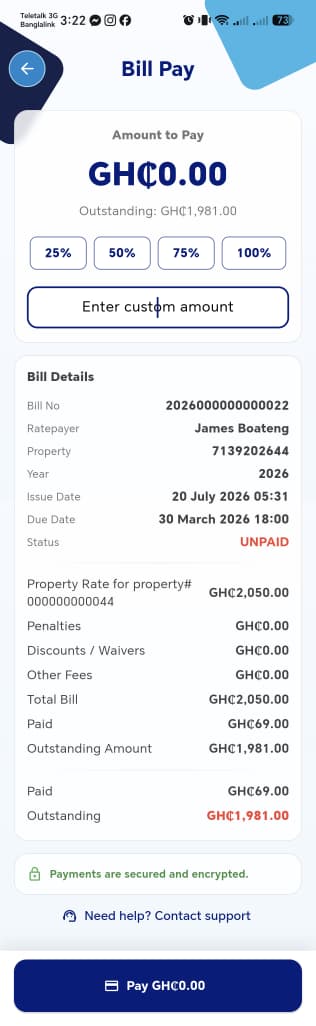
| Element | Description |
|---|---|
| Amount to Pay | Editable amount field, starts at GH₵0.00 |
| Outstanding | Read-only reference of the remaining balance |
| Quick-select buttons | 25%, 50%, 75%, 100% — auto-fill Amount to Pay as a percentage of Outstanding |
| Enter custom amount | Manual input, overrides the quick-select buttons |
Bill Details
| Field | Description |
|---|---|
| Bill No | |
| Ratepayer | |
| Property | Property ID |
| Year | |
| Issue Date | |
| Due Date | |
| Status | e.g. UNPAID (red) |
| Property Rate for property#... | Base rate amount |
| Penalties | |
| Discounts / Waivers | |
| Other Fees | |
| Total Bill | Sum of rate + penalties + fees, less discounts |
| Paid | Amount already paid to date |
| Outstanding Amount | Total Bill − Paid |
A Pay GH₵[amount] button at the bottom reflects whatever's currently in Amount to Pay, and a note confirms payments are secured and encrypted, with a Contact support link for help.
Things to check
- Quick-select percentage buttons calculate correctly against Outstanding, not the full Total Bill
- The Pay button label updates live as the amount changes, and is disabled/blocked at
GH₵0.00 - Overpaying (amount greater than Outstanding) is either blocked or handled sensibly
Total Bill = Property Rate + Penalties + Other Fees − Discounts/Waivers, andOutstanding = Total Bill − Paid— confirm the math holds in the UI- Paying via each available method (card, etc.) completes successfully
Payment Success
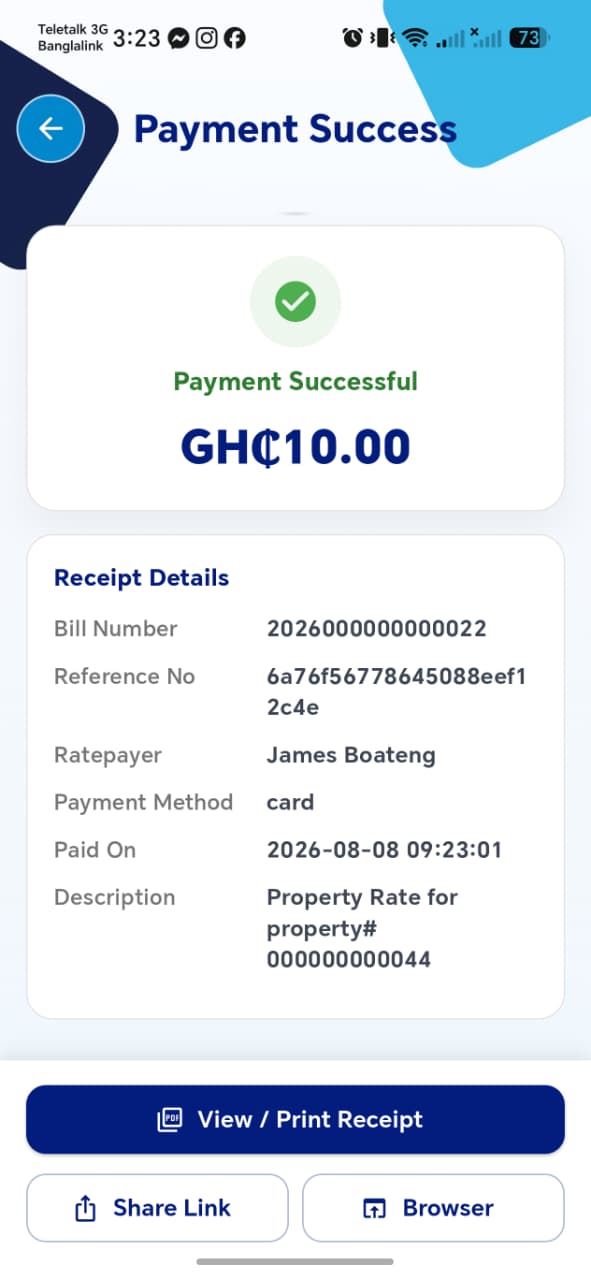
Shown immediately after a successful payment.
| Field | Description |
|---|---|
| Amount paid | |
| Bill Number | |
| Reference No | Unique transaction reference |
| Ratepayer | |
| Payment Method | e.g. card |
| Paid On | Timestamp |
| Description | e.g. Property Rate for property#... |
Actions: View / Print Receipt, Share Link, Browser (opens the receipt in-browser).
Things to check
- The paid amount, bill, and outstanding balance all update correctly on My Bill and the property's Bill Summary right after payment
- Reference No is unique per transaction, never reused
- Share Link produces a link that actually opens the receipt for someone without being logged in
Official Payment Receipt
Opened via View / Print Receipt. A formal, printable/exportable receipt.
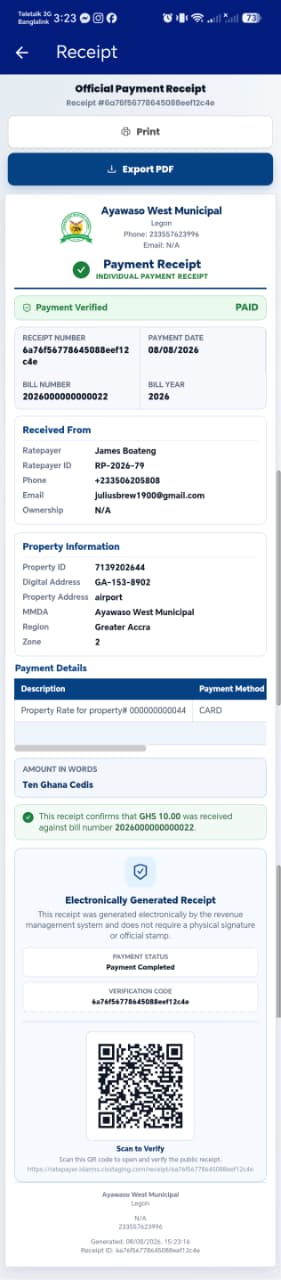
| Section | Contents |
|---|---|
| Header | Municipal name/logo, address, phone, email, "Payment Receipt" label, Payment Verified / PAID badge |
| Receipt info | Receipt Number, Payment Date, Bill Number, Bill Year |
| Received From | Ratepayer, Ratepayer ID, Phone, Email, Ownership |
| Property Information | Property ID, Digital Address, Property Address, MMDA, Region, Zone |
| Payment Details | Description + Payment Method table |
| Amount in Words | Spelled-out amount, e.g. "Ten Ghana Cedis" |
| Verification | Confirmation sentence, "Electronically Generated" note, Payment Status, Verification Code, and a QR code that opens a public verification page |
Actions: Print, Export PDF.
Things to check
- Export PDF produces a correctly formatted PDF matching the on-screen receipt
- The QR code's "Scan to Verify" link opens a public page confirming the payment, without requiring login
- Amount in Words matches the numeric amount exactly, including edge cases like decimals (e.g. GH₵10.50 → "Ten Ghana Cedis and Fifty Pesewas")
- Ratepayer ID and Property ID shown here match the ones shown elsewhere in the app for the same rate payer/property