Raise Dispute
Overview
Lets a rate payer file a dispute against a property, bill, or payment — e.g. an incorrect bill amount — and track its status through to resolution.
Navigate to: Home → Quick Actions → Raise Dispute
Disputes List
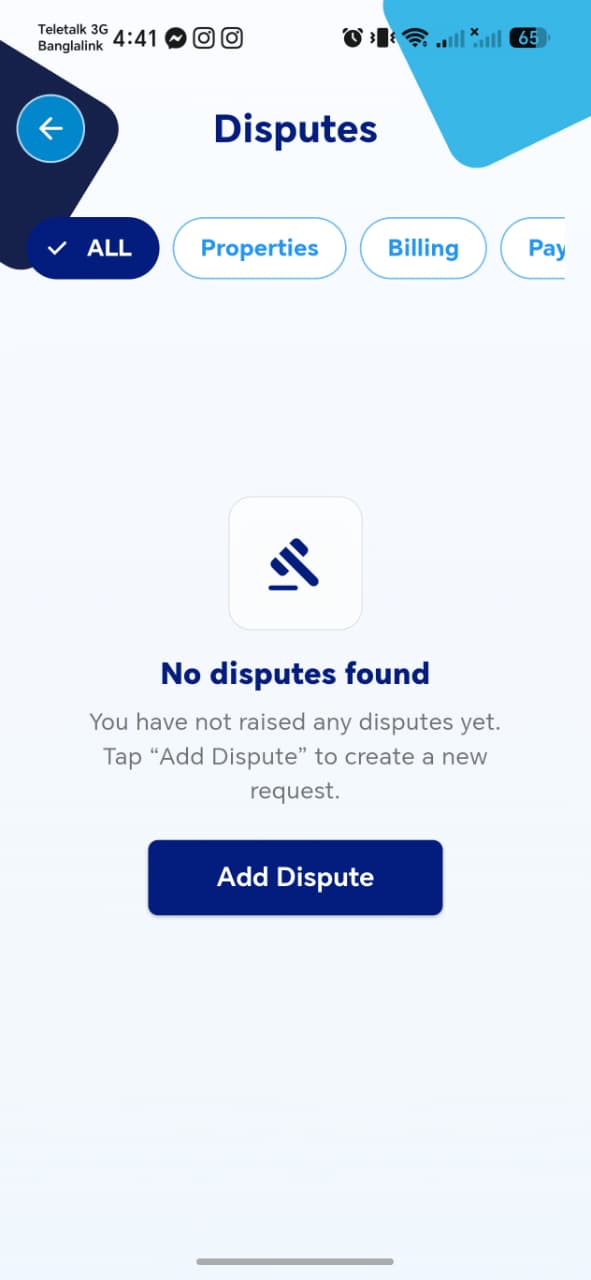
| Element | Description |
|---|---|
| Filter tabs | ALL, Properties, Billing, and at least one more off-screen (likely Payments) |
| Empty state | Gavel icon, "No disputes found," with a prompt to tap Add Dispute |
| Add Dispute button | Opens the Add Dispute form |
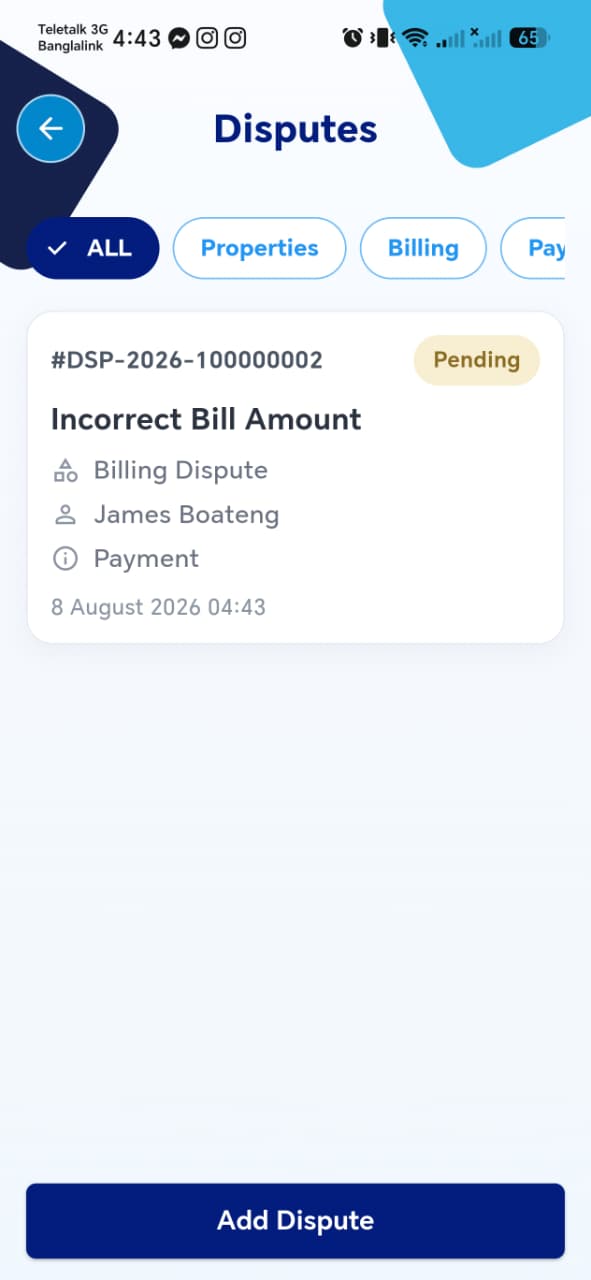
Once at least one dispute exists, the list shows a card per dispute instead of the empty state:
| Field | Description |
|---|---|
| Dispute ID | e.g. #DSP-2026-100000002 |
| Status badge | e.g. Pending |
| Title | e.g. "Incorrect Bill Amount" |
| Category | e.g. "Billing Dispute" |
| Filed by | Ratepayer name |
| Related Type | e.g. "Payment" |
| Date filed |
Things to check
- Filter tabs (
Properties/Billing/Payments) correctly narrow the list to disputes of that category - The empty state only shows when there are genuinely zero disputes matching the current filter — not zero disputes overall
- Tapping a dispute card opens the correct Dispute Details for that dispute
Add Dispute
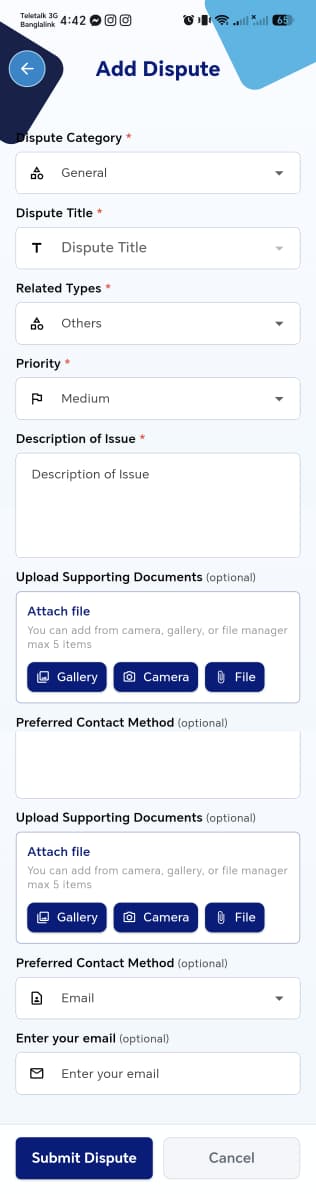
| Field | Required | Notes |
|---|---|---|
| Dispute Category | Yes | Dropdown, defaults to General |
| Dispute Title | Yes | Free text |
| Related Types | Yes | Dropdown, e.g. Others |
| Priority | Yes | Dropdown, defaults to Medium |
| Description of Issue | Yes | Free text |
| Upload Supporting Documents | No | Attach via Gallery, Camera, or File — max 5 items |
| Preferred Contact Method | No | Dropdown, e.g. Email |
| Enter your email | No | Shown when Preferred Contact Method is Email |
Submit Dispute / Cancel at the bottom.
Screenshot inconsistency
This screen's screenshot shows the Upload Supporting Documents and Preferred Contact Method sections twice, with an odd blank box in between — the same kind of scroll-capture artifact seen on the Individual Rate Payer Account Setup screen, rather than the real UI. Worth a quick visual pass against the live app to confirm the form only has one of each field.
Things to check
Dispute CategoryandRelated Typesoptions make sense together (e.g. does aBillingcategory restrictRelated Typesto billing-relevant options?)- Attaching more than 5 files is blocked with a clear message
Preferred Contact Methodcorrectly swaps the input below it depending on the method chosen (e.g. email field vs. a phone field)- Leaving all required fields blank and tapping Submit Dispute shows validation errors rather than silently failing
- After submission, the new dispute appears immediately in the Disputes List with status
Pending
Dispute Details
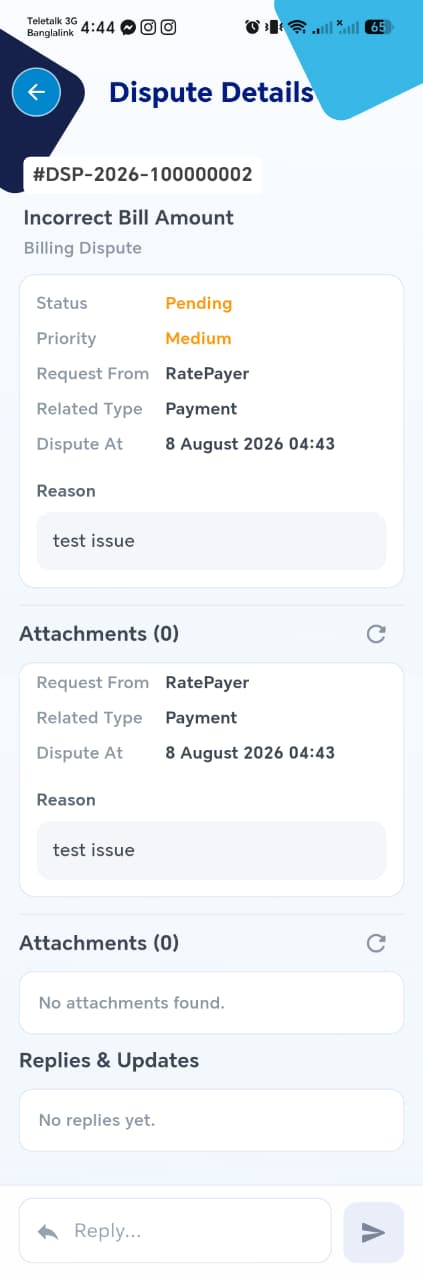
| Field | Description |
|---|---|
| Dispute ID | |
| Title / Category | |
| Status | |
| Priority | |
| Request From | e.g. RatePayer |
| Related Type | |
| Dispute At | Timestamp filed |
| Reason | The description entered when filing |
| Attachments (N) | Files attached — shows "No attachments found" when none, with a refresh icon |
| Replies & Updates | Thread of responses — shows "No replies yet" until an agent/admin responds |
| Reply input | Lets the rate payer add a follow-up message to the thread |
Screenshot inconsistency
Like the Add Dispute screen, this screenshot appears to show the Status/Priority/Reason block and Attachments section duplicated — likely the same capture artifact rather than real UI.
Things to check
- Status updates here (e.g.
Pending→In Review→Resolved) reflect promptly once an agent/admin acts on the dispute elsewhere in the system - Sending a reply actually posts to Replies & Updates and is visible without needing to leave and re-open the screen
- Attachments uploaded at filing time show up correctly here, with a working preview/download