Reports
Overview
The Reports module provides property bill reports with multiple filter options, allowing rate payers to view detailed billing information across their properties filtered by digital address, reference number, application ID, year, and bill number.
Navigate to: Sidebar → Reports or /reports
Reports Page
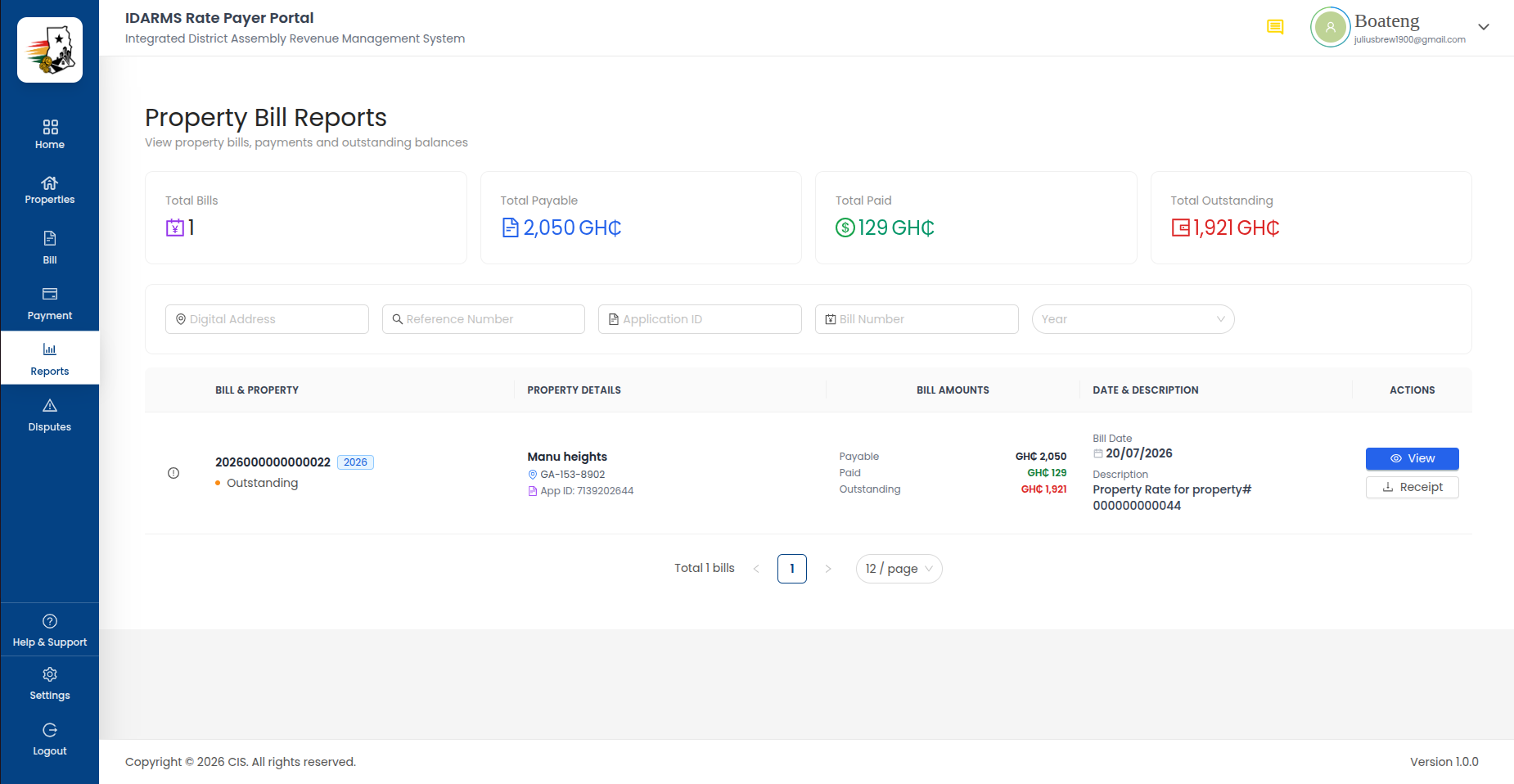
| Element | Description |
|---|---|
| Filter bar | Multiple filter fields for narrowing report data |
| Report table | Detailed bill report data matching the active filters |
| Export option | Export report data (if available) |
Filter Fields
| Filter | Description |
|---|---|
| Digital Address | Filter by Ghana Post digital address |
| Reference Number | Filter by property or bill reference number |
| Application ID | Filter by the property registration application ID |
| Year | Filter by billing year |
| Bill Number | Filter by specific bill number |
Report Table
| Column | Description |
|---|---|
| Bill Number | Unique bill identifier |
| Property | Property ID or name |
| Digital Address | Ghana Post digital address |
| Ratepayer | Name of the rate payer |
| Bill Amount | Total bill amount in GH₵ |
| Paid | Amount already paid |
| Outstanding | Remaining balance |
| Status | Bill status (Paid, Unpaid, Partial, etc.) |
| Due Date | Payment deadline |
Things to check
- Each filter field correctly narrows the report data
- Multiple filters can be combined (e.g. Year + Digital Address)
- Clearing a filter restores the full dataset
- Report data matches the values shown in the bill list and property details
- Empty results show a clear "No data found" message
- Report table columns are aligned and readable with long values
- Year filter defaults to the current year
Report Summary
The report may include a summary section at the top showing aggregate figures:
| Metric | Description |
|---|---|
| Total Billed | Sum of all bill amounts matching the filters |
| Total Paid | Sum of all payments matching the filters |
| Total Outstanding | Remaining balance across filtered bills |
Things to check
- Summary totals equal the sum of the individual rows in the report table
- Totals update when filters are applied or changed
- Report handles large datasets without performance issues
- Export (if available) produces accurate data matching the on-screen report
Things to check
- All filter combinations produce correct results
- Report data is consistent with bill list and payment history data
- Report loads within a reasonable time for typical datasets
- Clearing all filters returns to the full unfiltered report